

Table of content
If the largest plan is not enough, you have two options on the Plans page: stack several units of the largest plan yourself, or ask us for a custom plan.
Before you begin
- Only the workspace admin can buy a plan.
Steps
Stack units of the largest plan
Open Settings > Subscription and click Change plan (or See plans on Free).
Click Select on Growth 50K.
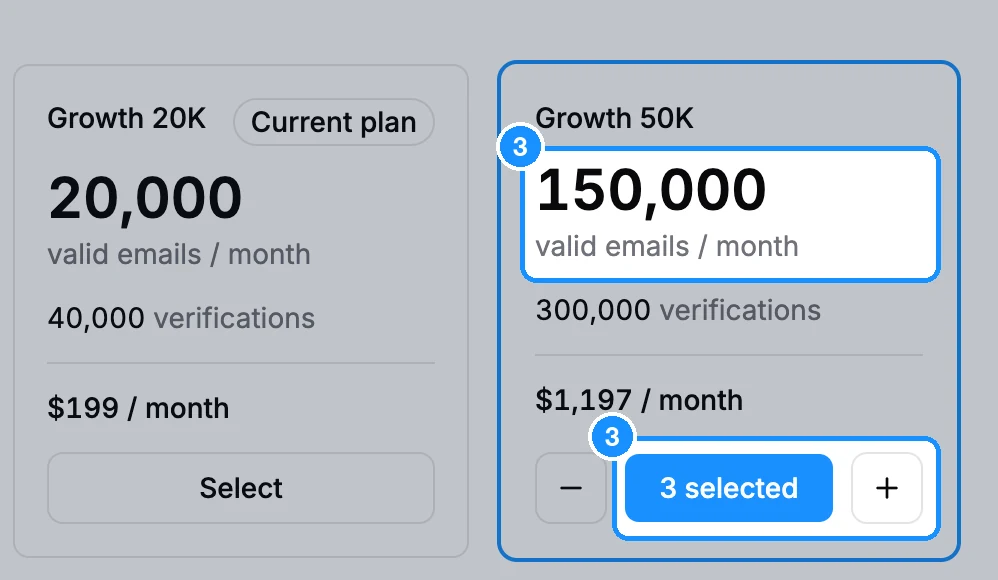
Use the plus and minus buttons on the card to choose up to 10 units. The card shows the total emails, verifications and price, for example "3 selected".
Click Subscribe and pay.
The price is the plan's price times the number of units. On Settings > Subscription your plan then shows "x3" next to its name, and it renews at that size.
Prices exclude tax and may change. The Plans page shows current prices.
Ask for a custom plan
For more than 10 units, invoice payment or custom terms, click the chat icon in the app's top bar and tell us the volume you need. Our team replies there with a quote.
FAQ
Can I buy, say, 100,000 email credits a month?
Yes: 2 units of Growth 50K. For other amounts, ask us in chat.
Can I change the number of units later?
Yes. Open the Plans page, change the units and pay. It works like any other plan change.