

Table of content
If you need a break, you can pause your plan for 1, 2 or 3 months instead of cancelling. You keep all your data, use the Free plan during the pause, and the plan restarts by itself. Pause lives in Settings > Subscription.
Before you begin
- Only the workspace admin can pause.
- Pause works on monthly paid plans with more than 100 emails a month. Yearly plans cannot be paused.
- You can pause once every 3 months.
- If Pause is greyed out, hover it to see why: "Yearly plans cannot be paused.", "You can pause once every 3 months." or "This plan cannot be paused."
Steps
Open Settings > Subscription.
Under Subscription status, click Pause.
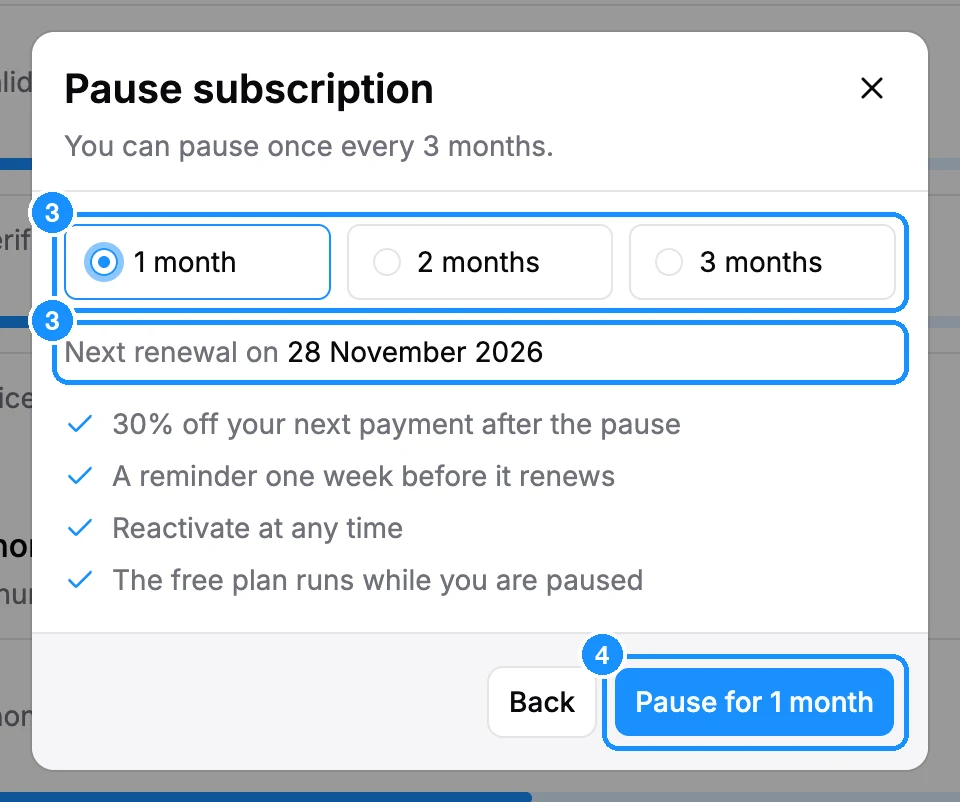
Pick 1 month, 2 months or 3 months. The dialog shows the Next renewal on date.
Click Pause for 1 month (or the period you picked).
What happens next
- Your current paid period runs to its end. Then the pause starts and the workspace gets Free plan amounts.
- The plan shows Paused with the date it resumes.
- We remind you one week before the plan renews.
- When the pause ends, the plan renews automatically and you are charged.
- Your next payment after the pause may be discounted, if the pause ran at least one month and no other discount is active.
Resume early
Click Resume under Subscription status. You pay for your plan now and a new period starts at once. You can also click Cancel while paused.
FAQ
Do unused credits carry over a pause?
No. During the pause the workspace is on Free plan amounts, and paid credits do not carry over.
Will I lose my lists and saved people?
No. Everything stays in your workspace.
Can I change plan when the pause ends?
Yes. Click Change plan at any time and pick another plan.