

Table of content
GetProspect was rebuilt around one database of people and companies. If you used the old version, this page shows where each feature went, where your old data is, and what we added back after your feedback. The old version is no longer available.
Old feature -> now
| CRM Contacts and Companies pages with custom views | Lists, plus the saved views All saved people and All saved companies |
| Fast Search | Top search box "Search people, companies, pages" (Cmd/Ctrl+K) |
| Dynamic custom views | Saved searches under My searches on People and Companies |
| Recent activity and search history | My searches > Recent and Saved |
| Custom properties and property groups | Removed. CRM integrations map a fixed list of fields |
| List folders, clone list, import into a list | Removed |
| Create a contact or company by hand | Removed. Find people in the database, or add a missing email to a saved person |
| Import a file to find emails | Enrichment > CSV enrichment |
| Update contacts by importing GetProspect IDs | Removed. GetProspect Person ID is still an export column |
| Ignore list import | Settings > Blocked, and Bulk include or exclude companies in the Company filter |
| Deleted section (180 days) | Settings > Trash, 90 days |
| Reset plan | Renew now on Settings > Subscription |
| Billing tab | Settings > Subscription and Settings > Billing |
| Usage inside Settings | Usage in the sidebar |
| Extension Scan mode and daily limits | Removed. The extension shows records from our database |
| Extension Import profiles by URLs | Enrichment > CSV enrichment with a LinkedIn URL column |
| Extension Insights and Activities tabs | Removed |
| Live email search that took seconds to minutes | Instant database lookups |
API v1 (/public/v1) | API v2 at https://api.getprospect.com/v2/... |
| Zapier New Contact trigger | New Saved Person and New Saved Company. Existing Zaps keep running |
Old bookmarks and links from the extension still work: they redirect to the matching page in the new app.
Where your old data went
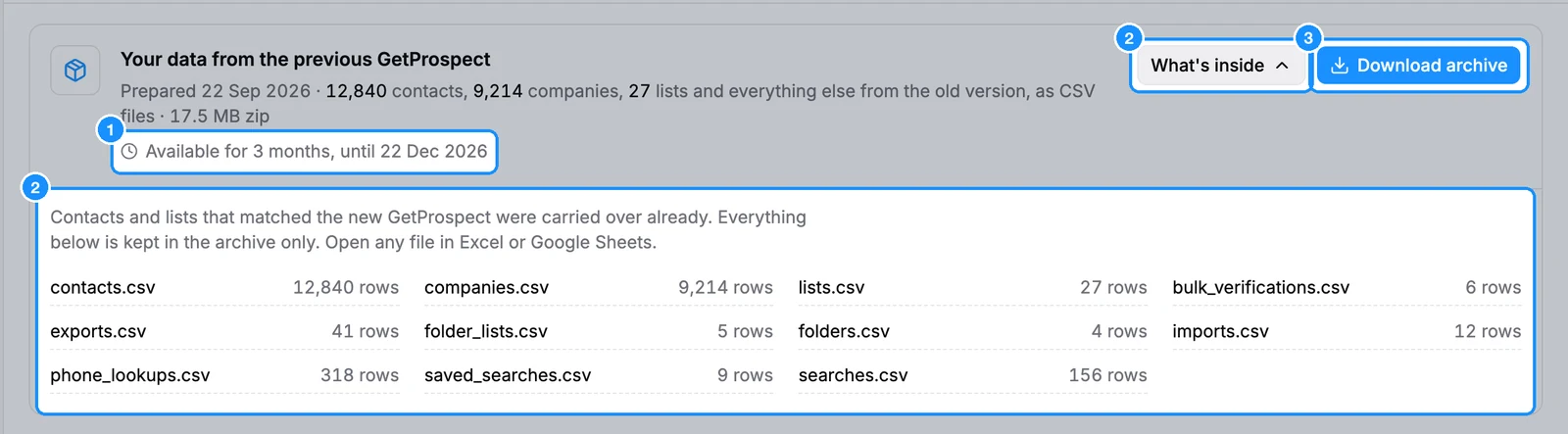
People and lists that matched the new database were carried over to your workspace already. Everything else from the old version is in a zip of CSV files.
- A banner at the top of the app reads "Your data from the previous GetProspect is ready to download." Click Download archive.
- The same archive is at the top of the Exports page, with What's inside to see each file and its row count.
- The archive is available for 3 months from the day it was prepared. The banner and the Exports page show the exact date.
- Hiding the banner hides it only for you. The archive stays on the Exports page.
Added back after your feedback
- Edit a saved person's name, email and phone, and a saved company's name. See Edit a saved person's or company's details.
- Remove someone from one list: untick the list from the row's list icon, or click the x on a list tag in the person panel. Delete removes people from every list and sends them to Trash.
- Show 25, 50 or 100 results per page.
- See every email a person has, one line per company, in the person panel.
- Search by email: type an address in the top search box, or use Enrichment > Email lookup.
FAQ
Can I go back to the old version?
No. The old version is gone. Download your archive before it expires.
Can I add a contact from scratch?
No. Find the person in the database or with the extension. If we have them without an email, save them and add the email yourself.