

Table of content
In People search, Reveal email shows a person's email but does not add them to a list. Add to list saves the person into a list and reveals their email in the same step. If you want to find people again later, add them to a list.
Before you begin
- Any member of the workspace can reveal and save.
- Credits: 1 email credit per valid email you do not own yet, whichever button you use. See "Credit usage".
Reveal and save compared
| Shows the email | Yes | Yes |
| Adds the person to a list | No | Yes |
| Shows up in Lists and All saved people | No | Yes |
| Cost | 1 email credit per valid email newly revealed that you do not own yet | 1 email credit per person whose email you do not own yet |
An email you revealed is yours in this workspace. Saving that person later costs nothing.
Steps: save people you already revealed
Open People and run the same search again. Emails you revealed show in the Email column, with no new charge.
Tick the people you want, then click Add to list. Pick a list, or type a name and click Create list "
" .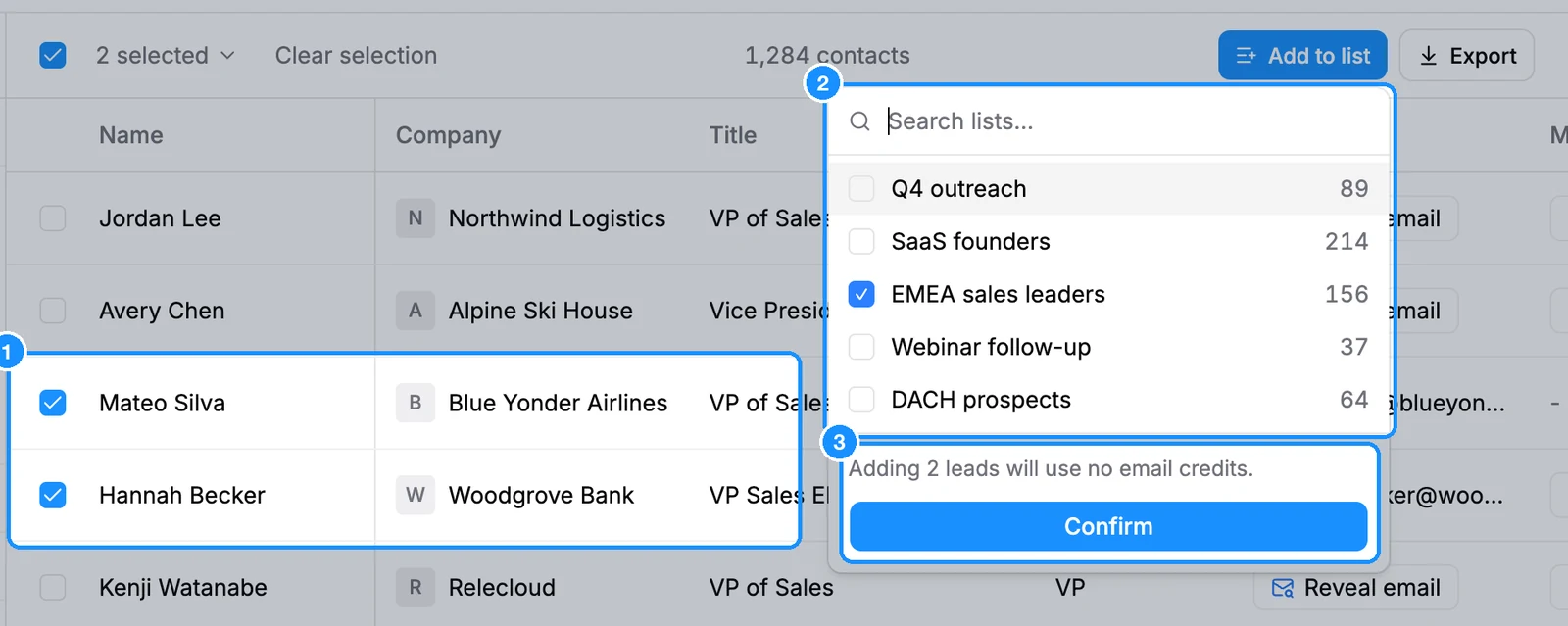
Check the cost line, then click Confirm. If the save needs more email credits than you have, the popover says "Not enough email credits" and Confirm stays off. Top up or tick fewer people.
To save one person, hover their row and click the + icon (tooltip Add to list), or open the person and click Add to list in the panel.
In the Chrome extension
- On a LinkedIn or Sales Navigator profile, Reveal email shows the email only. Use Add to list to save the person.
- On LinkedIn and Sales Navigator search results, pick a list at the top first. The row button then reads Reveal and save and saves the person into that list as it reveals. With no list picked, the button reads Reveal email and only reveals.
Credit usage
| Reveal email | 1 email credit per valid email newly revealed; not found is free |
| Add to list | 1 email credit per person whose valid email you do not own yet |
| Saving someone whose email you already revealed | Free |
| Saving people without an email | Free |
| Adding an already-saved person to another list | Free |
FAQ
I revealed emails all day and they are not in my list. Did I lose them?
No. Reveal email only shows the email; it does not save the person. Revealed emails stay paid for in your workspace, so nothing is lost. Run the search again, tick those people and click Add to list. It costs nothing for emails you already revealed. From the extension or a single lookup, click Add to list on the person or the result.
Can I save someone without picking a list?
No, every save goes into a list. Type a new name in the list picker to create one on the spot.
Will I be charged twice for the same email?
No. Once your workspace owns an email, revealing, saving or exporting it again is free.