

Table of content
You spend credits only when GetProspect hands you a new contact detail. Searching, browsing profiles and anything to do with companies is free. Your balances are in the credits menu in the top bar of the app.
Three balances
Each workspace has three separate balances, shared by everyone in it. One never pays for another.
- Email credits: revealing, saving, finding and exporting people's emails.
- Verification credits: checking emails in the Email verifier.
- Phone credits: revealing mobile numbers.
Credit usage
| People search, company search, opening a profile or company, filters | Free |
| Reveal email (app, extension, API) | 1 email credit per valid email newly revealed; not found is free |
| Add to list (save people) | 1 email credit per person whose valid email you do not own yet; people without an email are saved free |
| Add an already saved person to another list, create or rename lists | Free |
| An email you already own | Free again, anywhere in the workspace, while your workspace is active |
| Reveal mobile, Enrich mobiles (up to 25,000 at once) | 1 phone credit per number found; not found is free |
| Find email (Enrichment, API) | 1 email credit per email found that you do not own yet |
| CSV enrichment, people | 1 email credit per new email, plus 1 phone credit per mobile found if you opt in; matching and the estimate are free |
| CSV enrichment, companies | Free |
| Save, enrich or export companies | Free |
| Export people (CSV or Excel) | 1 email credit per included email you do not own yet; people whose emails you own export free; phones are never charged on export |
| Verify one email | 1 verification credit for a valid or invalid result; accept-all and unknown are free |
| Verify emails in bulk | 1 verification credit per unique, well-formed address, charged at the start whatever the result; refunded for rows not verified if the job is cancelled or fails |
Emails you own are free again
Once your workspace owns an email, you do not pay for it again while your workspace is active, subject to our Terms of Service. You own it if anyone in the workspace:
- revealed it,
- saved the person to a list (this also covers an email the person gets later), or
- paid for that address before, in any feature.
So re-saving, re-revealing or exporting people you already have costs nothing.
Phone numbers work differently: a mobile is free again only after you revealed it. Saving a person does not include their mobile.
When you do not have enough credits
Add to list and Export show the cost before you confirm. If it is more than your email balance, the button stays disabled and the dialog says how many credits you need. Narrow the selection, or get more credits (see Ran out of credits?).
If credits run out partway through a large save, the people saved so far stay saved and the rest are not added. Over the API, the last batch is saved with the emails withheld: you are not charged for them, and revealing them later costs credits as usual.
Examples
- You save 100 people. You already own the emails of 30, and 20 have no email. You pay 50 email credits.
- You export a list of 500 people you saved last month, and 40 of them have gained an email since. You pay nothing: saved people's new emails are already yours.
- You reveal 10 mobiles and 4 are found. You pay 4 phone credits.
- You verify a file of 1,000 rows with 50 duplicates and 10 badly formed addresses. You pay 940 verification credits at the start.
Where to see your balances
Click the credits button in the top bar. It shows the email credits you have left.
The panel lists Email credits, Verifications and Phone numbers as "used of" your limit, and when your credits renew.
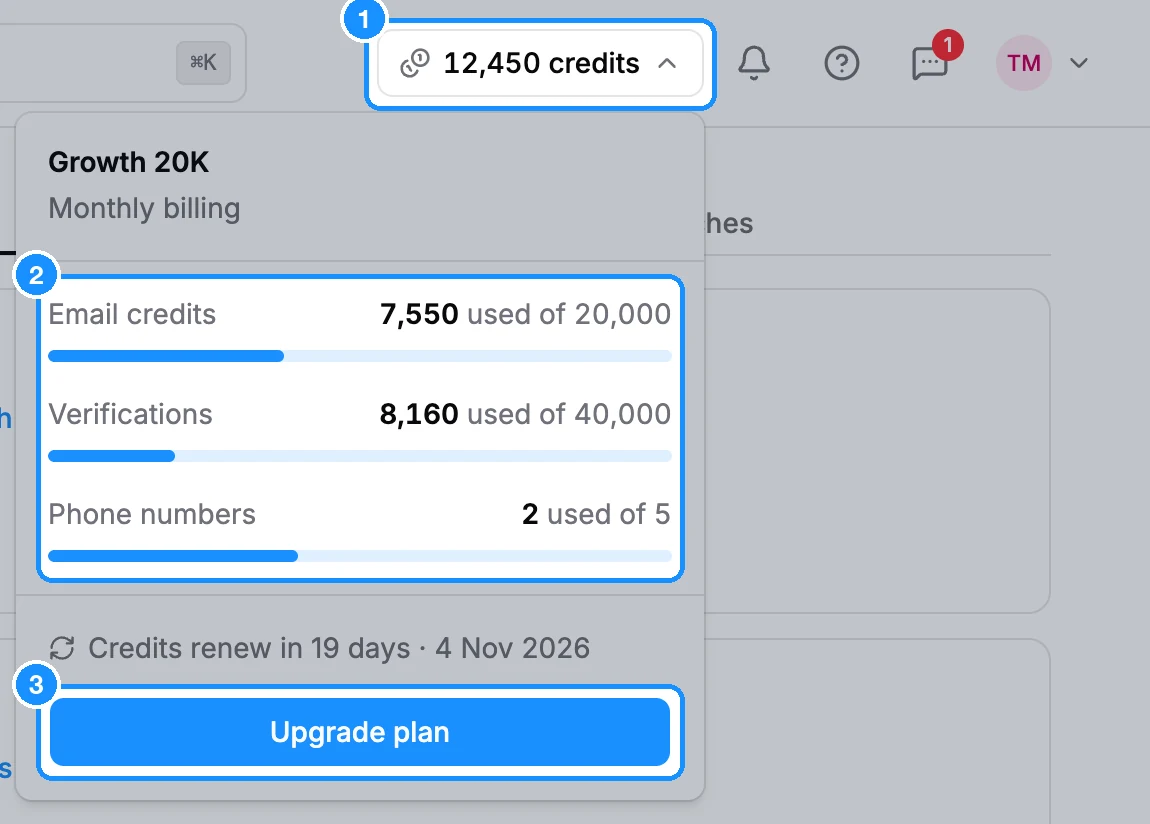
The button turns yellow when 5% or less of your email credits is left, and red at zero. For a breakdown by teammate and feature, open Usage.
FAQ
Do I pay for emails that are not found, invalid or accept-all?
No. GetProspect delivers only emails that passed our verification, and you pay only for those.
I revealed emails, then saved the same people. Was I charged twice?
No. A revealed email is yours, so saving that person afterwards is free.