

Table of content
Smart is a match mode of the Job Title filter in People. Besides your own titles, it searches the other job titles the same people hold, suggested by AI, so you reach more of the right people.
Before you begin
- Any workspace member can use it.
- Credits: none. Smart is free, like the rest of search.
- Each workspace has a daily number of new AI suggestions. See Daily limit below.
What Smart adds
People write the same job in many ways. "Head of Procurement" in Germany is also "Leiter Einkauf" and "Head of Purchasing". Smart adds:
- synonyms and abbreviations;
- other spellings, such as plurals;
- translations into the languages of the locations you search;
- related roles, depending on the level you pick.
Steps
Open People and, in the filter rail, open Job Title.
Type your job titles, for example "Head of Sales".
Under the titles, switch the match mode from Contains to Smart.
Pick a level: Same role, Similar or Related. Similar is selected by default.
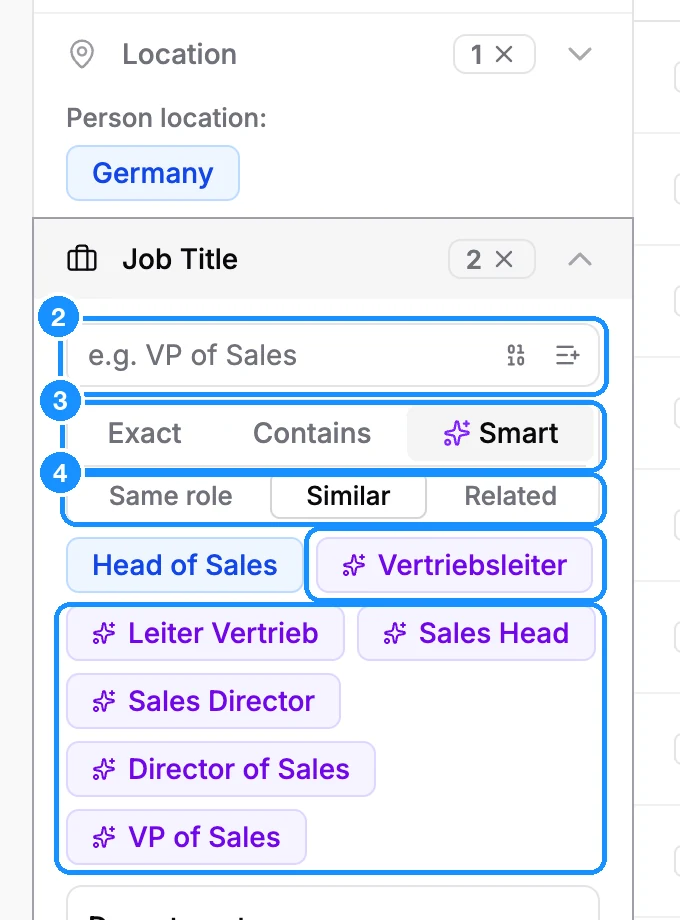
Check the AI titles. They appear after your own titles as violet chips with a sparkle. Hover a chip to see how many people it adds ("+N people"). Click x on a chip you don't want.
Results update as you go. Smart reads your locations, industries, seniority and departments, so changing them refreshes the suggestions. What you see in the filter is exactly what is searched.
The three levels
Each level adds everything the level before it adds, and more.
| Same role | Only other ways to write the same role: synonyms, abbreviations, translations | VP of Sales -> Sales VP |
| Similar | Also closely related roles at the same level | Head of Sales -> Sales Director |
| Related | Also broader roles in the same function | SDR -> Account Executive |
Switching the level is instant. The AI answers all three levels at once, so it does not use another suggestion.
Exclusions
When you exclude a title, Smart also excludes its other spellings. They appear after your excluded titles as amber chips with a sparkle. For example, excluding "Intern" adds "Trainee" and "Praktikant".
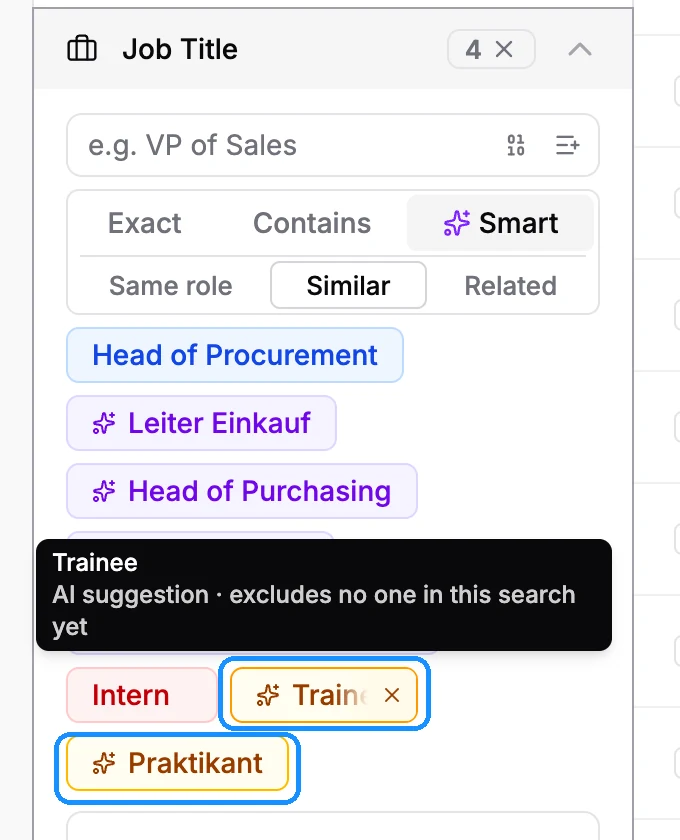
Hover an amber chip to see how many people it excludes. Some say "excludes no one in this search yet". That is expected: a title is excluded only in the job where it appears, and none of the people you search hold it in the matching job today. Keep it anyway. It keeps that role out if your titles widen.
Removing an AI chip
Click x on any AI chip, violet or amber, to remove it. It stays out of this search: when the suggestions refresh, it does not come back.
Daily limit
Each workspace can get a set number of new AI suggestions per day. Titles already suggested for the same titles and filters, and switching levels, do not count.
| Free | 30 |
| Starter | 200 |
| Growth 5K | 500 |
| Growth 20K | 1,000 |
| Growth 50K and above | 2,000 |
When the limit is reached, the filter says "Daily AI suggestion limit reached. Try again tomorrow or use Contains." The limit resets at 00:00 UTC. Contains and Exact keep working as usual, and suggestions you already have stay in the filter.
Use it in the API
- In People Search, set
person_job_title.match_modetoSMARTandsmart_leveltoSAME_ROLE,SIMILARorRELATED. See People Search. - To see the suggested titles and how many people each adds, call Smart Job Titles.
Credit usage
| Searching with Smart, getting AI suggestions, switching levels | Free |
FAQ
Why did Smart add no titles?
Smart leaves out titles that would add nobody, such as a variant your own titles already match. If the filter says "No AI suggestions at this level. Try a wider one.", pick Similar or Related.
What if AI suggestions are unavailable?
The filter says "AI suggestions are unavailable right now." Your search still runs on your own titles. Try again later, or use Contains.
Does Smart work with Boolean search?
No. A Boolean search expression replaces your job titles and the match mode until you remove it.