

Table of content
GetProspect now bills through Stripe. Some older subscriptions are still billed through FastSpring. If yours is, Settings > Subscription shows "Your subscription is billed through FastSpring. Card, receipts and renewals live in your FastSpring account." with Manage billing and Move to Stripe.
Before you begin
- Only the workspace admin sees this.
- Moving is a payment: you pay for your current plan through Stripe today. The days left on FastSpring are not refunded.
- On FastSpring, Extra credits (one-time packs) are not available. After the move they are.
Steps
Open Settings > Subscription and click Move to Stripe. (Or open Settings > Billing and click Change next to your FastSpring card.)
The Move your card to Stripe dialog shows your plan, its billing cycle and any paid phone credits that move with it.
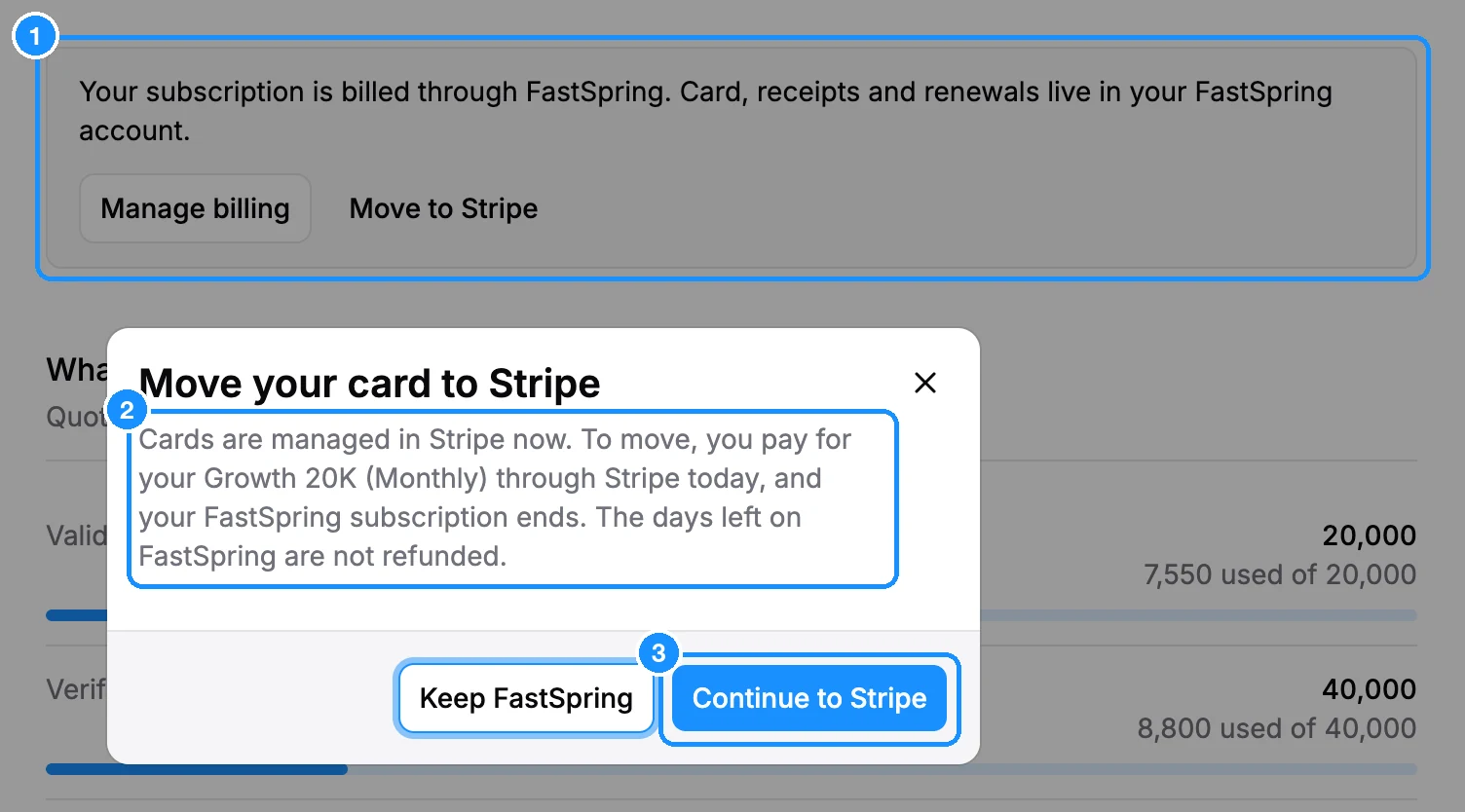
Click Continue to Stripe and pay on Stripe's checkout page. Click Keep FastSpring to stay as you are.
What happens next
- Your plan continues on Stripe, and your FastSpring subscription ends.
- Your card, invoices and tax are managed in Settings > Billing from now on.
- Your past FastSpring receipts stay in your FastSpring account.
If the dialog says "This plan is not available in Stripe. Contact support to move.", click Open chat and we will move you by hand. You may also be asked to verify your account first; see Why we review some accounts.